
CrownGreen Casino App Canada
The CrownGreen Casino app puts every game, deposit route, and responsible-play control directly on your phone — no app store visit required. We built this mobile experience for Canadian players who want slots, live dealer tables, and sports betting available the moment they unlock their screen. Open your browser, load the site, and you are playing within seconds. Here is everything you need to get moving fast.
The Mobile Version Explained
What changes on a smaller screen is mostly layout; what stays identical is everything that matters. Our full game catalogue — slots, live casino, crash games, sports betting, and progressive jackpots — loads through your browser exactly as it does on a larger display. The CrownGreen Casino mobile app experience is delivered as a browser-based install, meaning you add our site to your home screen directly from your mobile browser rather than downloading a package from an external store. That single step is all it takes to give the platform an app-like icon on your device.
The online Crowngreen site details page walks through account structure and game categories if you want a full overview before you start. Once the shortcut is on your home screen, it launches straight into the lobby, bypassing your browser’s address bar entirely. CrownGreen accounts combine casino, live casino, promotions, VIP, and sports betting in one interface — no separate logins, no switching apps.
- Same site, smaller screen — layout adapts automatically, no content is cut
- Install prompt — tap “Add to Home Screen” when your browser suggests it
- No store required — nothing to download from the App Store or Google Play
- Full game access — every title, filter, and cashier shortcut is available instantly
Setup Routes by Browser
The CrownGreen Casino app shortcut takes under a minute to create, and the exact menu path depends on which browser you are using. Tap the three-dot menu in Chrome or the share icon in Safari, then choose the relevant option below.
| Browser | Menu Path |
|---|---|
| Chrome (Android & iOS) | Tap the three-dot menu → select “Add to Home Screen” → confirm |
| Safari (iOS) | Tap the Share icon → scroll down → tap “Add to Home Screen” → tap “Add” |
Once set up, the icon sits alongside your other apps and launches the full lobby instantly. Our exclusive Crowngreen promo system page is worth checking before your first deposit — the welcome package runs up to $1,500 + 100 Free Spins on your first deposit alone, with additional offers across subsequent deposits bringing the total to $9,000 + 250 Free Spins. The Monday Kickstart “Fresh Start” promotion, worth up to $1,500, is also claimable through the mobile cashier without any extra steps. CrownGreen makes every promotion accessible from the same account whether you are on phone, tablet, or desktop.
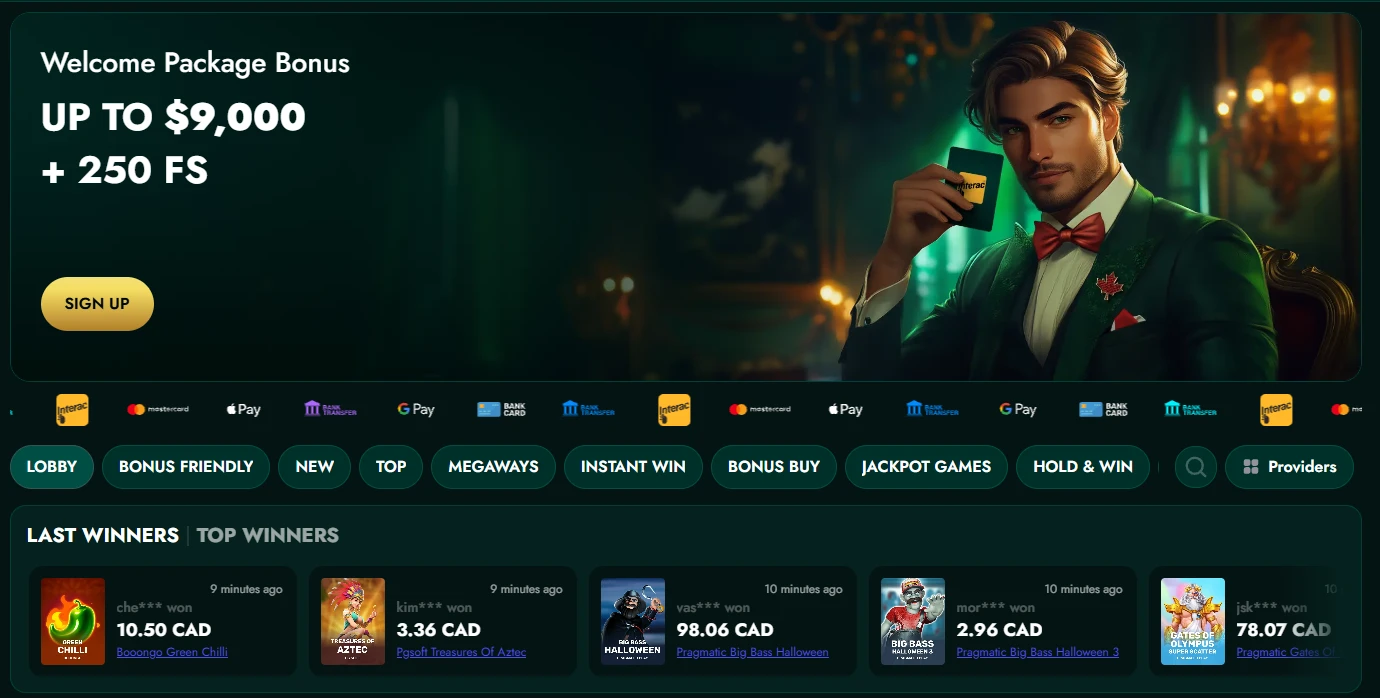
Finding Games Quickly
The CrownGreen app puts a filter row at the top of the lobby so you can jump straight to slots, live casino, instant games, or the sportsbook without scrolling through an unorganised list. Providers like Pragmatic Play, BGaming, Evolution, Hacksaw Gaming, Nolimit City, and over eighty others power the library, so the catalogue is large — smart filtering is the fastest route to your title.
Use the Crowngreen questions guide for detailed answers on game rules and account settings. The search field handles partial titles, so typing a few letters of “Elvis Frog Trueways” or “Gates of Olympus 1000” surfaces the exact game immediately. CrownGreen also surfaces RTP data on individual game cards, letting you compare return rates before you bet. Featured sections — Hot RTP Games, Bonus Buy, Jackpots, Megaways — are pinned near the top of the lobby for one-tap access.
- Filter row — routes directly to slots, live casino, instant games, and sportsbook with a single tap
- Search field — type a partial title to find any game in the library within seconds
- RTP screens — visible on each game card so you can check return rates before launching
- Featured sections — Bonus Buy, Jackpots, Megaways, and Hot RTP Games pinned at the top
Support While You Play
Our live chat widget stays accessible from within any game session on the CrownGreen app, so you never have to abandon a hand of live blackjack or pause a slot spin to get help. Tap the chat icon, type your question, and a support agent responds around the clock.
| Channel | Availability |
|---|---|
| Live chat | 24/7, accessible within the mobile session |
| Any time — responses during business hours |
The email address for written queries is available in our Terms and Conditions and on the Contact page. For cashier issues — particularly if you are paying by Interac, Apple Pay, or Google Pay — live chat is the faster option because agents can check transaction status in real time. CrownGreen routes all withdrawal requests through the same cashier panel you used to deposit, keeping the process consistent whether you are on a phone or any other device.

Practical Mobile Habits
A consistent pre-session routine makes every mobile visit faster and safer from the first deposit onward. Following these steps before you play cuts down on friction at the cashier and at withdrawal time.
- Add the shortcut early — install the home-screen icon before your first deposit so the cashier is one tap away, not buried in a browser tab
- Set limits first — use the account settings panel to confirm deposit, loss, wager, and session limits before any funds move
- Confirm your withdrawal route — verify that your chosen method (Interac, e-wallet, or card) is linked and active; minimum withdrawal is $60, and e-wallet approvals process in 0–24 hours
- Keep documents ready — upload KYC files early so that identity checks do not delay your first withdrawal; the minimum withdrawal limit is $60 and the daily cap sits at $15,000
If you plan to play on Android, the option to download CrownGreen app for android is handled through the same browser-based shortcut method — tap the Chrome menu, select “Add to Home Screen,” and the icon installs without any APK file or third-party store.
Data and Account Security
Every session through the CrownGreen Casino mobile app runs over encrypted connections, so your credentials and payment data are protected whether you are on a home network or a public Wi-Fi hotspot. Keep your login details private and never share your account — our Terms and Conditions make clear that account sharing is not permitted, and it creates risk for your balance and your personal data. On public networks, avoid saving passwords in shared browsers and consider using a private browsing tab for the session itself.
CrownGreen operates under licence ALSI-202411028-FI1, issued by the Anjouan Gaming Board, and we follow AML and Responsible Gaming policies that are published in full on our legal documents page. The platform sets a minimum age of 18+, and our responsible-play tools — deposit limits, loss limits, session timers, and wager caps — are all reachable from the account settings panel on mobile. Keeping those controls active is the single most effective habit for long-term, sustainable play.
Fitting the Casino Into Your Day
Players who benefit most from our mobile setup are those who play in short, deliberate windows rather than extended desktop sessions. The browser-based install means there is zero update friction — the CrownGreen app always reflects the current lobby, current promotions, and current tournament leaderboards the moment you open it. Active tournaments like Book of Billionaire ($2,250,000 prize pool) and Spin Express ($1,500,000) run continuously, so dipping in for a qualifying session during a lunch break is genuinely practical. Fast-track VIP entry — a single deposit of $1,500 reaches VIP Manor status — is equally accessible from the mobile cashier. Players who set their limits in advance, confirm their Interac or e-wallet route before depositing, and upload KYC documents early will find that the mobile experience removes almost every barrier between intent and action.
Frequently Asked Questions
Is live chat available on mobile?
Yes — the live chat widget is accessible directly within any mobile session, including during active games. You do not need to close your game or navigate away from the lobby to open it. Agents are available around the clock, every day of the week.
How do I search for a specific game?
Tap the search field at the top of the lobby and type a partial or full game title. The results update as you type, so you will see matching titles within a couple of keystrokes. This works for slots, live tables, crash games, and instant-win titles alike.
Are RTP figures shown on phones?
RTP data is displayed on individual game cards throughout the mobile lobby. You can check the return-to-player percentage before you launch any title, which is useful when comparing similar slots side by side. Our Hot RTP Games section groups the highest-return titles in one place for quick reference.
Which browser should I use?
Chrome works well on both Android and iOS, and Safari is the natural choice on Apple devices. Both browsers support the “Add to Home Screen” function that creates the CrownGreen Casino app shortcut on your device. Either option delivers the full game library and cashier without limitation.
Can I set limits from my phone?
Absolutely. The account settings panel on mobile includes deposit, loss, wager, and session limit controls. CrownGreen recommends setting these before your first deposit rather than after, so your session boundaries are in place from the start. The controls update immediately and apply to all future sessions across every device linked to your account.